
Works with ChatGPT
Gym reports in ChatGPT: revenue, attendance and profit
ChatGPT gym reports give you the numbers from MyGymDesk's Reports screens without opening them. Ask for last month's revenue, the payments from the last seven days, your busiest hours or your profit, and ChatGPT reads the same figures your dashboard shows, for the period you name.
The MyGymDesk app is coming soon to the ChatGPT app directory. Connect it today through ChatGPT's developer mode.
Reviewed
Which ChatGPT gym reports you can ask for
Six of the connector's tools are reports. Each one reads a MyGymDesk report screen, so the answer is the dashboard's own figure in a sentence or a table. Every example below is real, from Ironline Fitness, a demo gym in Bengaluru, run in ChatGPT on 5 Oct 2026.
Revenue and collections
Revenue for any period, with the change against the previous period of the same length, what it was paid for by type and by plan or item, and collections by payment mode. The lines always add up to the revenue.
Payments received
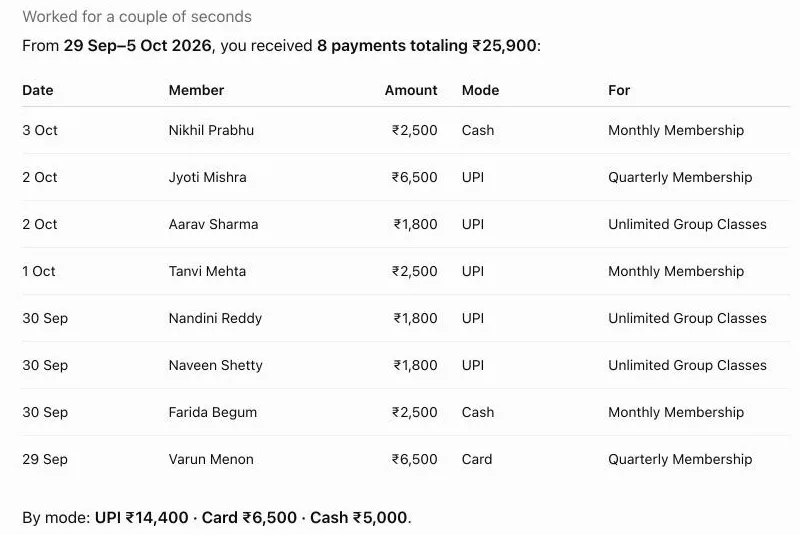
Every payment in a period, as Reports › Payments lists it: the date, who paid (a member, a lead or a walk-in), the amount, the mode, what it was for and the invoice number, with totals by mode. Name a member instead, and you get that one member's payment history as their member page shows it. The screenshot above is “List the payments we received in the last 7 days.”
Attendance and busiest hours
Check-ins for a period, how many members they came from and how often each came, then check-ins by day, by weekday and by hour on your gym's own clock. Visit days include classes and personal training.
You: What were our busiest days and hours over the last 30 days?
ChatGPT's reply
Over the last 30 days (Sep 6–Oct 5), you had 639 check-ins from 52 members. Busiest days: Sep 23: 33; Sep 14: 31; Sep 7 & Sep 30: 30 each; Sep 29: 29. Busiest hours: 6–7 PM: 165 — clear peak; 6–7 AM: 117; 8–9 AM: 66; 7–8 AM: 61; 9–10 AM: 58. By weekday, Monday was busiest (108), closely followed by Tuesday (104) and Wednesday (103). Sunday was quietest (44). The strongest staffing/capacity pressure is therefore 6–7 PM, with 6–10 AM forming the main morning rush.
Members by status, plan and branch
Active, expired and inactive members, counted exactly as the Members screen counts them, with active members by plan and by branch. Over a period it adds new members against the previous period, who is frozen now, and whose membership ended without a renewal.
You: How many active members do we have at each branch?
ChatGPT's reply
You currently have 50 active members: Indiranagar: 29; HSR Layout: 21. That's 58% Indiranagar and 42% HSR Layout.
Expenses, profit and margin
For gyms that track expenses in MyGymDesk: approved expenses as totals per category, then revenue, profit and margin, as Reports › Profit & Loss shows them. Single expenses and who was paid are never listed.
You: What were our expenses and profit last month?
ChatGPT's reply, summarised
For September 2026 across all branches, ChatGPT gave revenue, expenses, profit and a profit margin of 34.3%, then the largest expense categories: staff salaries and rent first, followed by electricity, equipment, marketing and maintenance.
Personal training by trainer
Sessions delivered and no-shows per trainer for a period, plus the sessions booked for the next 7 days. A trainer who asks sees only their own sessions, as in MyGymDesk, and pay or commission never appears.
The same numbers as your Reports screens
ChatGPT writes the sentence; MyGymDesk supplies the figures. Each report tool uses the calculation behind the matching screen: dues come from the Payment Due list, member counts from the Members screen, payments from Reports › Payments and profit from Profit & Loss.
Periods can be named the way you would say them, such as today, this week, this month, last month, the last 30 days or this year, or given as two dates. A period can reach back up to 24 months, and revenue and new members are compared with the previous period of the same length.
From a report to a decision
The useful part of a report is what you do next, and in a chat the next question is one line away. The attendance answer above ended by pointing at the 6–7 PM peak; a natural follow-up is “What classes do we run between 6 and 7 PM this week?”, which reads the class schedule with bookings and waitlists.
The same goes for money. A revenue answer by payment mode can lead to “List the payments we received last month” to check the cash entries, and a profit answer can lead to a look at the largest expense categories with your manager.
Who can see which report
Reports follow the same permissions as the dashboard. Revenue, payments and dues need the role to see reports; expenses need the expenses permission; personal training needs the PT permission, and a trainer sees only their own sessions. If a staff member's role can't open a report in the dashboard, ChatGPT can't open it for them either.
Staff costs show only as an expense category's total. Nobody's pay, bank or ID details appear in any report the connector reads.
Connect MyGymDesk to ChatGPT
- In ChatGPT, open Settings and turn on developer mode.
- Add a new app and give it the MyGymDesk server URL:
https://mcp.mygymdesk.com/mcp - Sign in with your MyGymDesk login, pick your gym if asked, and approve.
- Start a chat with MyGymDesk added, and ask your first question.
The MyGymDesk app is coming soon to the ChatGPT app directory. Every step, permissions and how to disconnect: Connect MyGymDesk to ChatGPT.
What the connector costs
The connector is included on Pro and Enterprise; Growth can add it for $5/month or $50/year.
MyGymDesk itself comes with a free 14-day trial, and no credit card is needed to start.
See plans and pricingFrequently asked questions
Are the figures the same as my MyGymDesk dashboard?
Can I compare this month with last month?
Can I get a report for one branch?
Do I need expense tracking for the profit report?
Which MyGymDesk plans include ChatGPT gym reports?
Keep reading
- ChatGPT prompts for gym owners
Copy-ready prompts grouped by job: money, members and renewals, classes and PT, leads, and changes, with real answers.
- Gym dues and renewals in ChatGPT
Who owes money, whose plan ends soon and who may not renew, then a payment reminder, an extension or a freeze, each asked first.
- Claude vs ChatGPT for gym owners
Both work with MyGymDesk. What is the same, what differs (directory, setup, approvals, teams) and which to pick for how you work.
Reports and the rest of MyGymDeskAll ChatGPT and Claude guides
ChatGPT is a trademark of OpenAI. Claude is a trademark of Anthropic. MyGymDesk is not affiliated with or endorsed by either.
Put your own gym in the chat
Start a free 14-day MyGymDesk trial, or book a demo and walk through the app with our team.