
Works with ChatGPT
ChatGPT prompts for gym owners that use your real data
These ChatGPT prompts for gym owners work on your own numbers, not on generic advice. Each one asks MyGymDesk, through ChatGPT, about your members, money, classes or leads. Below are the prompts grouped by job, with the real answers ChatGPT gave on a demo gym, and tips for getting precise results.
The MyGymDesk app is coming soon to the ChatGPT app directory. Connect it today through ChatGPT's developer mode.
Reviewed
How to write ChatGPT prompts for gym owners that get exact answers
The connector does the looking up, so a good prompt is mostly about being specific. These habits make the answers sharper:
- Name the period. “Last month”, “the last 30 days”, “this week” or two dates all work, and a period can reach back up to 24 months.
- Name the branch when it matters. Adding “at Indiranagar” narrows today's numbers or the class schedule to that branch.
- Name the member the way MyGymDesk knows them, or use their member code. If two members match, ChatGPT shows both and asks which one you mean.
- For a payment reminder, give the bill number, such as BILL-2026-00005, so the right bill gets chased.
- When you only want to see what would happen, say so: “Show me a preview, don't book it yet.” A preview changes nothing.
Ask follow-up questions in the same chat, such as “Show that as a table”. ChatGPT builds on the answer it already has instead of starting again.
Prompts about money
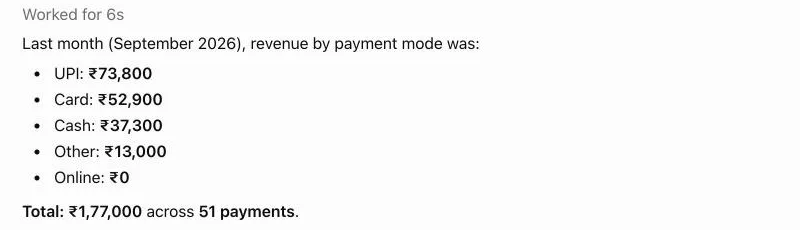
These read the same figures as your Reports screens, so the totals match your dashboard. The screenshot at the top of this page is the first prompt in the list.
- “Show last month's revenue by payment mode.” Revenue against the month before, what it was paid for, and collections by mode.
- “List the payments we received last month.” Totals by mode, then each payment with its date, payer, amount, mode, item and invoice number.
- “Show Smitha Nambiar's payment history.” One member's payments, as their member page shows them.
- “Which members owe money, oldest first?” The Payment Due list, with the total at the top.
- “What were our expenses and profit last quarter?” Expenses by category, then revenue, profit and margin, as Profit & Loss shows them.
Prompts about members and renewals
Start with one member when someone is standing at the desk, and with the whole list when you plan the week. A member lookup reads plans, class packages, dues and visits together:
- “Who has a membership ending in the next 7 days?” Memberships and packages not yet renewed, soonest first, with any dues.
- “Who has an active plan but hasn't visited in 2 weeks?” Members at risk, longest absent first, with their last visit.
- “Which renewals are coming up and who might not renew?” Renewals due in the next 30 days, and which of those members have also stopped visiting.
- “How many active members do we have, by plan?” The same counts as the Members screen, by plan and by branch, with this month's new members.
You: Look up member Kavya Hegde.
ChatGPT's reply
Kavya Hegde (IF000014) is an active member at Ironline Fitness – HSR Layout. Quarterly Gym Membership: 19 Aug – 16 Nov 2026; 10-Class Pack: 9 of 10 sessions remaining, expires 25 Nov 2026; Outstanding dues: ₹0; Last visit: 2 Oct 2026; Visits in last 30 days: 12.
Prompts about classes and personal training
Class questions are where a chat beats a screen: one prompt gives you a whole week, with the full and empty sessions side by side.
- “What classes are on tomorrow and how full are they?” Each session's time, class, trainer and booked places.
- “When are our busiest hours this month?” Check-ins by weekday and by hour, on your gym's own clock.
You: Show this week's class schedule at Indiranagar.
ChatGPT's reply
This week at Ironline Fitness – Indiranagar (5–11 Oct) there are 16 class sessions: Mon 5: 7:00 AM HIIT Blast 6/16; 5:00 PM Yoga Flow 0/20; 6:30 PM Spin 45 0/10 · Tue 6: 6:00 AM Strength Circuit 0/14; 7:00 AM HIIT Blast 0/16 · Wed 7: 7:00 AM HIIT Blast 1/16; 5:00 PM Yoga Flow 0/20; 6:30 PM Spin 45 8/10 + 2 waitlisted · Thu 8: 6:00 AM Strength Circuit 0/14; 7:00 PM Zumba 5/25 · Fri 9: 5:00 PM Yoga Flow 0/20; 6:30 PM Spin 45 1/10 · Sat 10: 8:00 AM Zumba 1/25; 9:00 AM Zumba 0/25; 9:30 AM Strength Circuit 3/14 · Sun 11: 8:30 AM Yoga Flow 4/20. The busiest session is Wednesday's 6:30 PM Spin 45, which already has a 2-person waitlist.
You: How many PT sessions did each trainer run last month?
ChatGPT's reply
Last month (1–30 September 2026): Sameer Khan: 9 PT sessions; Vivek Iyer: 9 PT sessions. Total: 18 sessions.
Prompts about leads and follow-ups
Leads go cold when the follow-up slips. These prompts show who is due a call and let you note the outcome while the call is fresh:
- “Show my hot leads.” Open leads, new leads this month and follow-ups due, then the open hot leads by name and status, without phone numbers or emails.
- “Log that I called lead Rajat Khurana: interested, call back Friday.” A preview of the response and the next follow-up; after your yes, the follow-up is closed and the next one is scheduled.
- “Add a lead: Meera Rao, +91 50000 00499.” A preview with the name, the last four digits of the phone and the branch; once you say yes, the lead is added. The same phone number a second time is refused.
Prompts that make a change
These change something in MyGymDesk, so each one starts with a preview you can read. All eight end the same way: ChatGPT asks “Shall I go ahead?”, and nothing is booked, scheduled, checked in, extended, frozen, cancelled or sent until you answer yes.
- “Book Kavya Hegde into tomorrow's 7am HIIT Blast.”
- “Add a Strength Circuit class tomorrow at 5pm at HSR Layout.”
- “Schedule Yoga Flow Mon/Wed/Fri at 5pm for 4 weeks at Indiranagar.” One preview lists every date, and one approval creates the whole series.
- “Check Aditya Rao in now.”
- “Extend Ananya Krishnan's membership by 7 days.”
- “Freeze Aarav Sharma's membership for 7 days, travelling.”
- “Cancel tomorrow's 7am Yoga Flow at HSR Layout, trainer unwell.”
- “Send Dev Arora a payment reminder for BILL-2026-00003.”
Swap in your own members, classes and bills. If a detail is missing, such as which branch a new lead belongs to, ChatGPT asks before it previews.
Connect MyGymDesk to ChatGPT
- In ChatGPT, open Settings and turn on developer mode.
- Add a new app and give it the MyGymDesk server URL:
https://mcp.mygymdesk.com/mcp - Sign in with your MyGymDesk login, pick your gym if asked, and approve.
- Start a chat with MyGymDesk added, and ask your first question.
The MyGymDesk app is coming soon to the ChatGPT app directory. Every step, permissions and how to disconnect: Connect MyGymDesk to ChatGPT.
What the connector costs
The connector is included on Pro and Enterprise; Starter and Growth can add it for ₹300/month + GST or ₹3,000/year + GST.
MyGymDesk itself comes with a free 7-day trial, and no credit card is needed to start.
See plans and pricingFrequently asked questions
Do these prompts work in ChatGPT without MyGymDesk?
How far back can a prompt go?
Can ChatGPT show the answer as a table?
What if two members have the same name?
Which MyGymDesk plans can use these prompts?
Keep reading
- ChatGPT for gym owners
A day in a gym owner's life with MyGymDesk connected to ChatGPT: the morning check, renewals, quiet members and desk bookings.
- Gym reports in ChatGPT
Revenue, payments, attendance and busiest hours, members by branch, PT by trainer, and profit and loss, read from your Reports screens.
- Claude prompts for gym owners
Prompts sorted by the moment you need them, from opening up to month-end, with what Claude did when we ran them.
ChatGPT is a trademark of OpenAI. Claude is a trademark of Anthropic. MyGymDesk is not affiliated with or endorsed by either.
Put your own gym in the chat
Start a free 7-day MyGymDesk trial, or book a demo and walk through the app with our team.