
🎉 MyGymDesk New Feature Update: Automated WhatsApp Messages for Your Gym
Managing member communication manually can be time-consuming. Following up on payments, sending expiry reminders, and wishing members on their birthdays often gets missed when the gym is busy.
That’s why we’re excited to introduce a new feature in MyGymDesk.
You can now send automated WhatsApp messages to your gym members — directly from your MyGymDesk dashboard.
No extra tools.
What Are Automated WhatsApp Messages?
Automated WhatsApp messages allow your gym to send important updates to members automatically, without manual typing or follow-ups.
Once set up, messages are triggered based on actions or dates, so nothing slips through.
What Messages Can You Send Automatically?
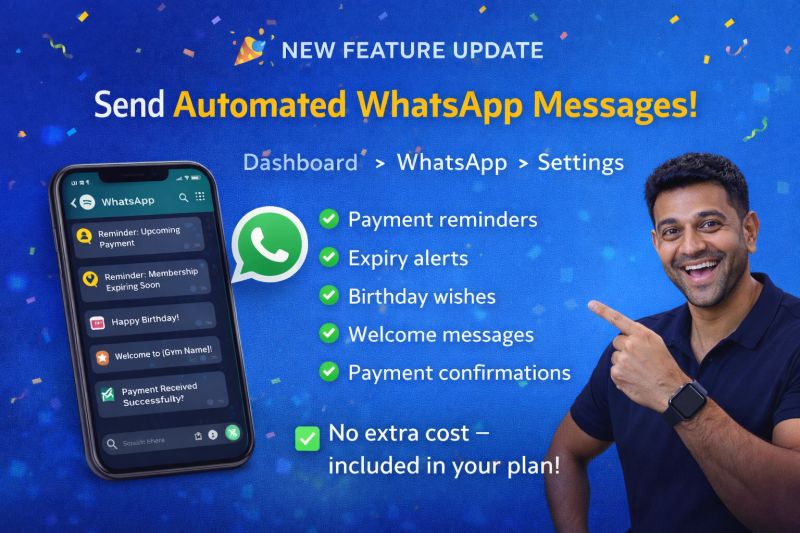
With this update, your gym can auto-send:
-
Payment reminders
Reduce missed payments and awkward follow-ups. -
Membership expiry alerts
Remind members before their plan expires. -
Birthday wishes
Add a personal touch that improves member loyalty. -
Welcome messages
Make new members feel valued from day one. -
Payment confirmations
Instantly reassure members after payment.
All messages go directly to WhatsApp — the platform your members already use daily.
Why This Feature Matters for Indian Gyms
For Indian gym owners, WhatsApp is the fastest and most effective communication channel.
This feature helps you:
- Save time on daily follow-ups
- Improve payment collection
- Look more professional
- Keep members engaged automatically
No more forgetting reminders or sending messages one by one.
How to Set It Up
Setting up automated WhatsApp messages is simple:
- Go to Dashboard
- Click WhatsApp
- Open Settings
- Enable the messages you want
That’s it. The system takes care of the rest.
Which plans include it
The pricing page shows the plans that include WhatsApp automation.
Just simple, smart gym management.
Start Using It Today
If you’re already using MyGymDesk, log in and enable automated WhatsApp messages today.
If you’re not on MyGymDesk yet, you can try it with a 7-day free trial.
- No credit card required
- Setup in minutes
Visit: https://mygymdesk.com
Start free trial: https://mygymdesk.com/signup